AI Privacy Settings Compared: ChatGPT, Gemini, Claude, Copilot and Meta AI
What happens to what you type into AI assistants, how to stop your chats being used for training in each app, and what never to share with any AI tool.
Millions of people in Sri Lanka now type questions, homework, business emails and personal worries into AI assistants every day. Most never think about where that text goes. AI companies store conversations, and depending on the service and your settings, they may use them to improve future models, and trained staff may review samples for safety. None of this is secret, but the settings that control it are buried in menus and change names regularly. This guide compares the privacy controls in the five AI assistants people here use most, shows where to find them, and sets out simple rules for what you should never share with any AI tool.
Key points
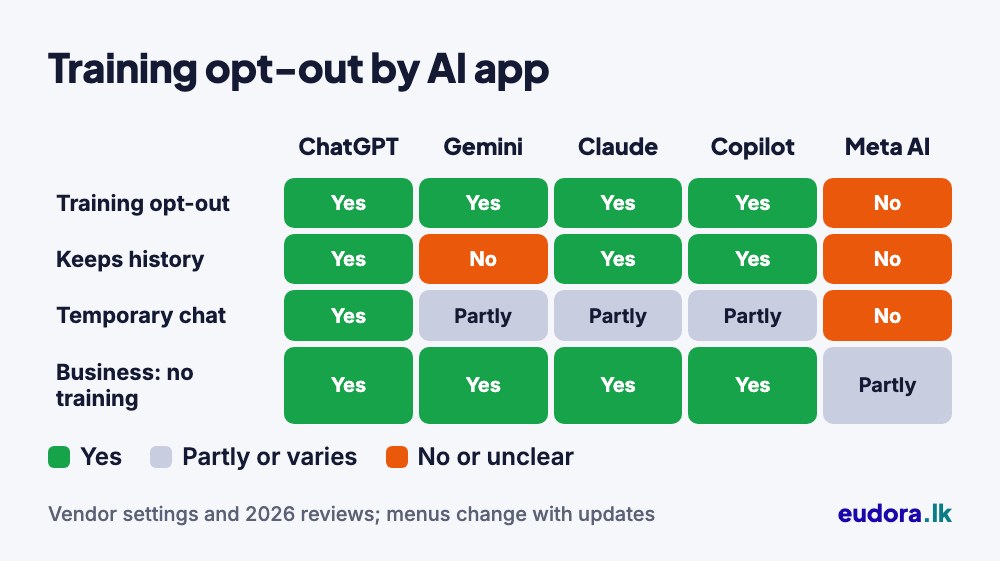
- ChatGPT, Gemini, Claude and Copilot all offer a setting to stop your chats being used to train their AI, but the names and side effects differ.
- Turning off Gemini’s Keep Activity also turns off saved chat history; ChatGPT lets you keep history while opting out of training.
- Meta AI inside WhatsApp, Facebook and Instagram has no simple switch; avoid sharing personal details with it.
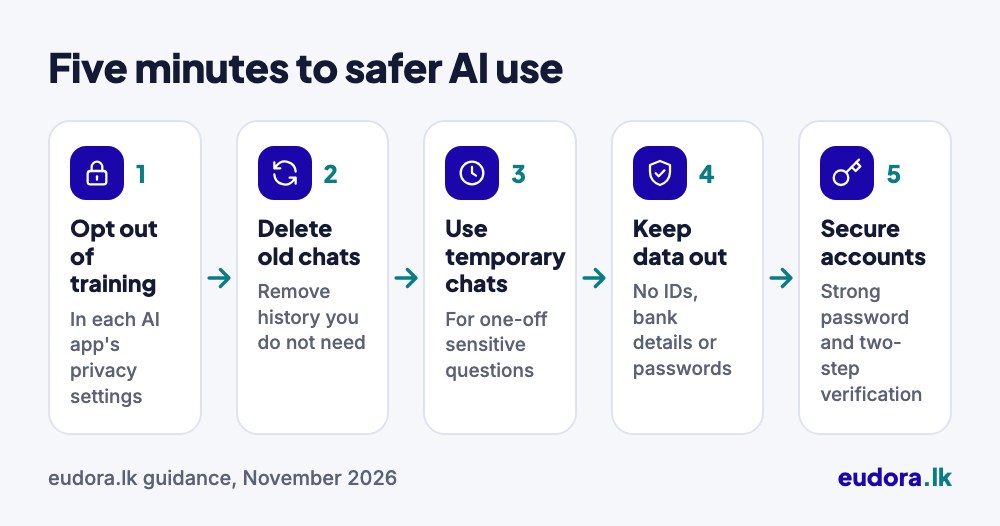
- Opt-outs usually apply to future chats only. Delete old conversations you do not want kept.
- Never paste ID numbers, bank or card details, passwords, medical records or customer data into a free AI tool.
What AI companies do with your chats
When you use a consumer AI assistant, the company typically stores your conversations so you can see your history, uses them to keep the service safe, and may use them to train and improve future models unless you opt out. A small sample may be reviewed by people, often with identifying details removed. Business and education plans usually work differently: the provider commits not to train on your data by default, and an administrator controls retention.
| Use of your data | Consumer free and paid plans | Business and enterprise plans |
|---|---|---|
| Saved chat history | Usually yes, you can delete | Controlled by your organisation |
| Used to train models | Often by default, with an opt-out | Not by default |
| Human review of samples | Possible, per privacy policy | Limited, per contract |
| Admin controls and audit | No | Yes |
ChatGPT
ChatGPT has the clearest controls. In the app or website, open Settings, then Data controls, and turn off “Improve the model for everyone”. Your chats stay in your history but are not used to train OpenAI’s models. For a one-off sensitive question, start a Temporary Chat, which is not saved to your history and is not used for training, though it may be kept briefly for safety checks.
- Open Settings from your profile picture.
- Choose Data controls.
- Switch off “Improve the model for everyone”.
- Use Temporary Chat from the chat menu for anything sensitive.
- Review Memory under Personalisation and delete anything you do not want remembered.
Google Gemini
Gemini’s main control is called Keep Activity, previously Gemini Apps Activity. Turning it off stops Google using your future Gemini chats to improve its models, unless you give feedback on a response, but it also stops saving your chat history and limits some features that rely on it. You can instead keep it on and set automatic deletion after three, eighteen or thirty-six months.
Note: Even with Keep Activity off, Google keeps conversations for a short period to provide the service and for safety. Do not treat it as a private diary.
On Android phones, Gemini can also read what is on your screen when you ask it to. That is useful, but be careful when banking apps or private messages are open.
Claude and Microsoft Copilot
Anthropic updated Claude’s consumer terms in 2025 so that users choose whether their chats help improve Claude. Check Settings, Privacy, and switch the option off if you prefer. Microsoft’s consumer Copilot has privacy settings that include turning off model training on your conversations, and you can view and delete Copilot activity from your Microsoft account privacy dashboard.
| App | Where to look | Setting to change | Side effect |
|---|---|---|---|
| ChatGPT | Settings, Data controls | Improve the model for everyone: off | None; history stays |
| Gemini | Gemini settings, Activity | Keep Activity: off, or auto-delete | History not saved when off |
| Claude | Settings, Privacy | Help improve Claude: off | None |
| Copilot | Copilot settings, Privacy | Model training: off | None |
| Meta AI | No simple switch | Use Meta’s objection forms where offered | Varies by region |
Menu names change with app updates. If you cannot find a setting, search the app’s help pages for “training” or “activity”.
Meta AI in WhatsApp, Facebook and Instagram
Meta AI appears as a blue circle in WhatsApp and inside Facebook, Instagram and Messenger. Your normal personal WhatsApp chats remain end-to-end encrypted, and Meta says it cannot read them. Conversations you have directly with Meta AI, or messages where you mention @Meta AI in a group, are different: they are processed by Meta to produce answers and may be used to improve its AI. Reports in 2026 found there is no simple in-app switch to stop this, and opt-out options depend on your region and Meta’s forms.
- Do not share personal, financial or health details with Meta AI.
- Avoid tagging @Meta AI in family or work groups where others have not agreed.
- Use WhatsApp’s Advanced Chat Privacy option in sensitive groups where available, which limits AI features in that chat.
AI built into phones, keyboards and photo apps
AI is no longer only in chat apps. Phone keyboards suggest replies, photo galleries search your pictures by what is in them, email apps summarise messages and phones transcribe calls and voice notes. Much of this now runs on the phone itself, which keeps the data local, but some features send content to the cloud. Samsung’s Galaxy AI, for example, lets you choose whether certain features process data only on the device, and Apple says Apple Intelligence runs on the device where possible and uses its Private Cloud Compute for larger requests.
Spend five minutes in your phone’s settings under AI or intelligence features. Turn off anything you do not use, and prefer on-device processing where the option exists, especially for call transcription and message summaries.
Children and AI accounts
Most AI services require users to be at least 13, and some require parental consent until 18. Children often use AI for homework through a parent’s account or a school account. If they use your account, remember that their conversations sit in your history and may be used for training under your settings. Google Family Link and Apple Screen Time let parents control which AI apps children can install, and school-provided accounts often have stricter data protection than personal ones. Talk to children about not sharing their full name, school, address or photos with AI chatbots, just as with strangers online.
What never to share with any AI
Generally fine
- General questions and explanations
- Drafting emails without private details
- Homework help and study notes
- Public information and your own creative writing
Keep out
- NIC, passport and bank account numbers
- Card details, passwords and one-time codes
- Medical records and test results with your name
- Customer lists, staff records and company finances
A good test: if you would not post it on a public noticeboard, do not paste it into a free AI tool. For anything sensitive, remove names and numbers first, or describe the situation in general terms.
At work: business plans and the law
For businesses, personal data of customers and staff is protected by Sri Lanka’s Personal Data Protection Act, and pasting it into consumer AI tools can breach your obligations. Use business versions of AI tools, where the provider does not train on your data and you control retention, and write a short policy telling staff what is allowed. Our post on the PDPA deadline explains the wider duties, and our comparison of AI assistants covers the business plans.
Protect the account itself
Your AI chat history can reveal a great deal about you, which makes the account valuable to criminals. Use a strong, unique password and turn on two-step verification for your OpenAI, Google, Microsoft and Meta accounts. Sign out of AI apps on shared computers. If your Google or Microsoft account is compromised, an attacker can read your AI history along with your email.
Our home security checklist covers the network side, and our cybersecurity team runs short staff sessions on safe AI use for offices.
Frequently asked questions
Does ChatGPT use my conversations to train its AI?
For consumer accounts it may, unless you turn off “Improve the model for everyone” in Data controls. Temporary Chats are not used for training.
Can Meta read my WhatsApp messages?
Personal chats are end-to-end encrypted. Messages you send to Meta AI, or that mention @Meta AI, are processed by Meta.
Does turning off Gemini activity delete old chats?
It stops saving new activity. Delete older activity separately in your Google account’s Gemini activity page.
Are paid AI plans more private than free ones?
Not automatically. Personal paid plans usually follow the same training settings as free ones. Business and enterprise plans are the ones that exclude training by default.
Is it safe to upload documents to AI tools?
Only if they contain no personal or confidential information, or you are using a business plan your organisation has approved.

Eudora Technology is a Kandy-based team working on CCTV, networks, IT support, cloud and websites for homes and businesses across Sri Lanka.