
Hard drives fail, laptops get stolen and ransomware can lock every file on a network in minutes. The only real protection is a backup you have tested. We help you choose the right storage, set up automatic backups and check that you can restore your files when you need them.
What we set up
- NAS storage: a central file server for the office, with user folders, remote access and snapshots.
- 3-2-1 backups: three copies of your data, on two different types of storage, with one copy off-site.
- Cloud backup: encrypted off-site copies of computers and servers, monitored by our team.
- Upgrades: SSDs to speed up older computers and larger drives for growing data.
- Surveillance storage: hard drives rated for 24-hour CCTV recording.
Backup packages
Backup System Setup
Design and setup of a 3-2-1 backup plan using a NAS, external drive and/or cloud, with a tested restore.
- Backup plan for your data and devices
- NAS, external drive or cloud configuration
- Automatic schedules and retention
- Email alerts for failed backups
- Test restore and handover
Managed Cloud Backup (per device)
Encrypted off-site backup for one computer or server, up to 500GB, monitored by our team.
- Up to 500GB per device
- Encrypted, automatic daily backup
- Version history (30 days)
- Monitoring and failure alerts
- Restore assistance
Microsoft 365 / Google Workspace Setup
Setup of Microsoft 365 or Google Workspace on your domain: email, DNS, users, devices and mailbox migration.
- Domain verification and DNS (MX, SPF, DKIM, DMARC)
- Up to 10 user accounts
- Email migration from old mailboxes
- Phone and computer setup
- Staff handover session
Cloud Server Setup
Setup of a cloud server (VPS or AWS/Azure) for an application, file server or remote access, with security hardening.
- Provider and size recommendation
- Server build and security hardening
- Firewall and backups
- Application deployment
- Monitoring and handover
The 3-2-1 rule in practice
For a small office, a simple plan might be the working files on each computer, a nightly copy to a NAS in the office and an encrypted copy in the cloud. If a laptop fails, you restore from the NAS in minutes. If the office is broken into or flooded, the cloud copy is still safe. We explain the rule in more detail on our blog.
Storage products
-
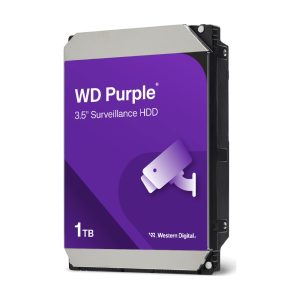
 Western Digital
WD Purple 1TB Surveillance Hard Drive
Rs 20,100 Add to cart -
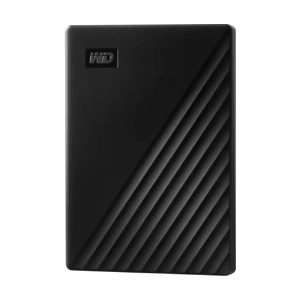
Western Digital
WD My Passport 2TB Portable Hard Drive – USB 3.2, Hardware Encryption
Rs 41,500 Add to cart -
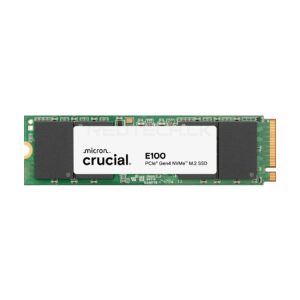
Crucial
Crucial E100 1TB M.2 NVMe SSD – PCIe 4.0
Rs 52,800 Add to cart -
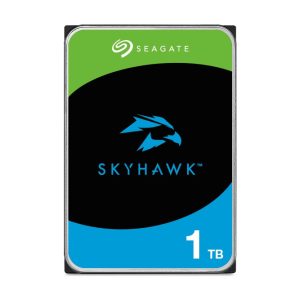
Seagate
Seagate SkyHawk 1TB Surveillance Hard Drive
Rs 20,100 Add to cart
How it works
- Review. We look at what data you have, where it lives and how much you can afford to lose.
- Design. You get a backup plan with storage, schedule and retention in writing.
- Setup. We install the NAS or drives, configure automatic backups and encrypt off-site copies.
- Test. We restore sample files with you, so you know the backup works.
Frequently asked questions
Is an external hard drive enough?
It is a good start, but a single drive kept next to the computer can fail or be stolen at the same time. Add a second copy somewhere else, such as a NAS or the cloud.
What is a NAS?
Network attached storage is a small file server with two or more drives. The whole office can share files on it, and it can keep automatic backups and older versions of files.
Does a backup protect against ransomware?
Yes, if at least one copy is offline or protected with versioning, so the ransomware cannot reach it. We set up snapshots or off-site copies for this reason.
How often should backups run?
Most offices back up daily. If losing a day of work would hurt, we can back up every few hours or keep files in sync as they change.