How to Spot AI-Generated Photos and Videos: A 2026 Guide for Families
AI fakes are now realistic enough to fool most people. The visual clues that still help, the free tools that check watermarks and credentials, and habits that protect your family.
A photo of a politician in a place they never visited. A video of a famous cricketer recommending an investment scheme. A voice message from a relative asking for money. In 2026 all of these can be made with AI in minutes, and the best fakes are realistic enough to fool almost anyone at a glance. The old advice to look for six fingers or strange backgrounds still helps sometimes, but it is no longer enough. This guide explains the clues that still work, the free tools that can check whether an image was made or edited by AI, and the simple habits that protect your family from being fooled or scammed.
Key points
- Visual clues help less each year; the most reliable signals are now invisible watermarks and content credentials.
- Google’s SynthID watermark marks content from Google’s AI tools, and the Gemini app can check images for it.
- Content Credentials (the C2PA standard) record how a photo was made and edited; some cameras and phones now add them automatically.
- Most harm comes from fakes that ask you to act: send money, click a link, share outrage. Pause and verify through another source.
Why AI fakes are harder to spot now
Early AI images had obvious mistakes: extra fingers, melted earrings, garbled text and impossible shadows. Current models from Google, OpenAI and others produce photographs that are technically clean. Video generators make realistic movement with matching sound, and voice cloning needs only a short recording. At the same time, real photos are increasingly edited with AI features built into phones, so “edited” and “fake” are not the same thing.
That means spotting fakes is now less about looking hard at pixels and more about checking where something came from, whether it carries provenance information, and whether reliable sources confirm it.
Visual clues that still help
| Where to look | Possible signs of AI |
|---|---|
| Hands, teeth and ears | Wrong number of fingers, merged teeth, mismatched earrings |
| Text and signs | Misspelt or meaningless letters, especially in Sinhala or Tamil |
| Backgrounds | Repeating patterns, warped lines, people blending together |
| Lighting and shadows | Shadows pointing different ways, faces lit differently from the scene |
| Skin and hair | Too smooth, plastic-looking skin; hair melting into the background |
| Video | Lips slightly out of sync, unnatural blinking, glitches when the head turns |
| Voice | Flat emotion, odd pauses, background noise that does not match the setting |
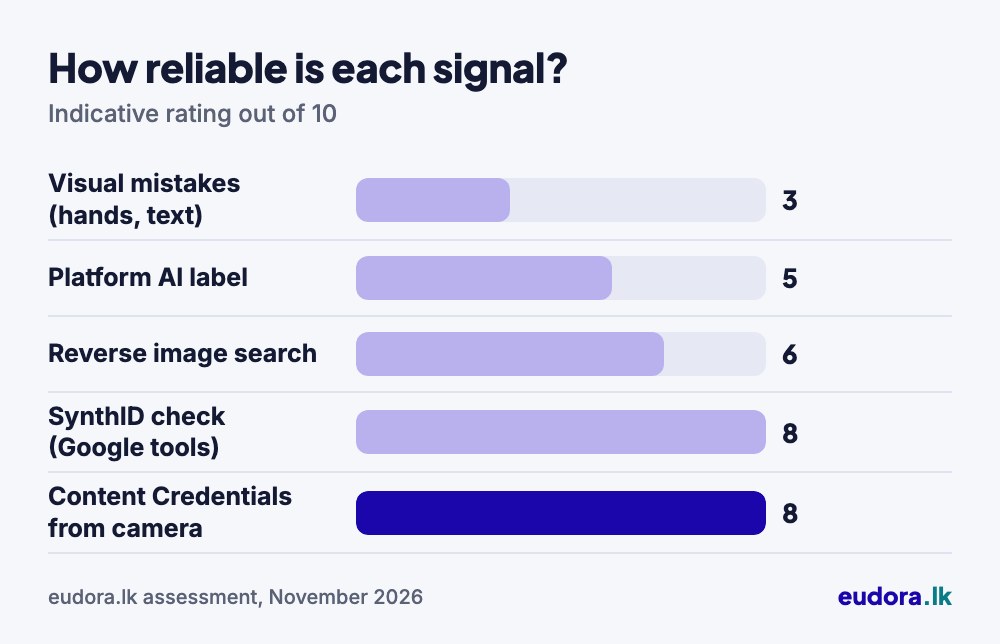
Treat these as hints, not proof. A real photo can have strange lighting, and a good fake may show none of these signs. The absence of mistakes does not mean an image is real.
Invisible watermarks: SynthID
Google adds an invisible watermark called SynthID to images, video and audio created with its AI tools. You cannot see it, but software can detect it even after the image is cropped or compressed. Google lets people upload an image to the Gemini app and ask whether it was created or edited with Google AI, and in 2026 announced that verification would extend to Google Search and Chrome.
The limitation is obvious: SynthID only identifies content from Google’s tools. Other companies use their own watermarks, and some open-source tools add none at all. A negative result means only that this particular watermark was not found.
Content Credentials: the “nutrition label” for photos
Content Credentials, based on the C2PA standard supported by Adobe, Microsoft, Google, OpenAI and many camera makers, are a tamper-evident record attached to a file. They can show which camera or app created the image, and whether AI tools were used to generate or edit it. Some phones, including Google’s latest Pixel models, now add Content Credentials to photos taken with the built-in camera, and social platforms such as Instagram have been adding labels based on them.
| Check | What it tells you | Limits |
|---|---|---|
| Content Credentials present, says camera | Strong sign it is an original photo | Credentials can be stripped when files are re-saved |
| Content Credentials say AI-generated | The creator’s tool recorded AI use | Only if the tool supports C2PA |
| No credentials | Unknown | Most images online still have none |
| SynthID detected | Made or edited with Google AI | Only Google tools |
| Platform “AI info” label | The platform detected AI signals | Can miss fakes or mislabel edits |
Reverse image search and source checks
For any image that matters, search for it. Google Lens and other reverse image search tools find where else the picture appears, often revealing that it is old, from another country or from a stock photo site. Check who posted it first, whether reliable news organisations report the same thing, and whether the account is new or has a history of real posts.
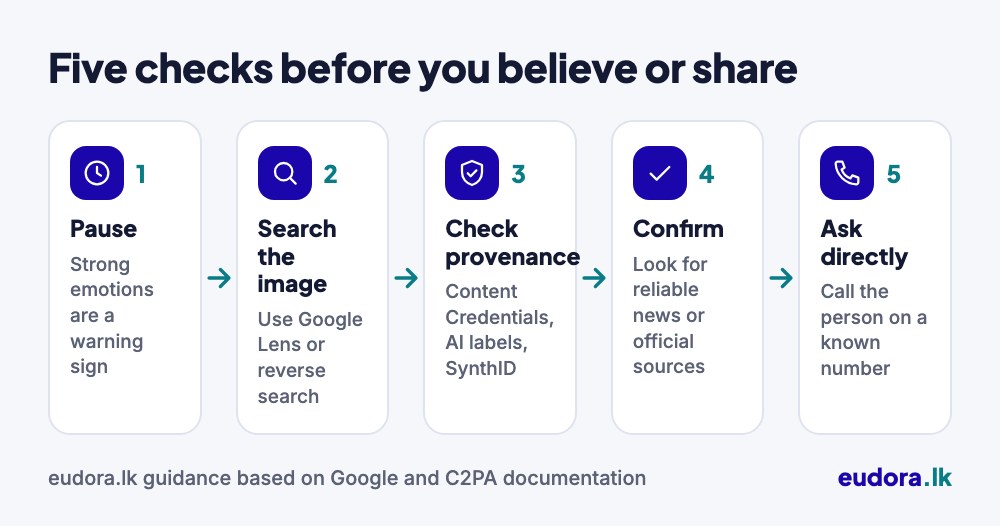
- Pause. If it makes you angry, frightened or excited, that is the moment to slow down.
- Search the image with Google Lens or a similar tool.
- Check provenance: look for Content Credentials or an “AI info” label, or ask the Gemini app about SynthID.
- Look for confirmation from established news outlets or official accounts.
- Ask the person through a known phone number if the image or message involves someone you know.
Deepfakes used in scams
The most common harmful use of AI fakes in Sri Lanka is not politics; it is money. Fake videos of celebrities or business leaders promote investment schemes, fake product adverts use AI images, and cloned voices of family members ask for urgent transfers. Sri Lanka CERT warned in December 2025 about a rise in scams on social media using fake promotions and rewards.
Rule: No genuine celebrity, bank or government office asks you to invest, pay a fee or share a code through a social media advert or a voice message. Verify through official websites or phone numbers you already know.
Our guide to online scams in Sri Lanka covers the scams themselves in detail, including what to do if you have already sent money.
Floods, elections and breaking news
Fakes spread fastest when people are anxious and want information quickly: during floods and landslides, power cuts, elections and major news events. AI images of flooded towns, collapsed buildings or crowds can be shared thousands of times before anyone checks them, and they can cause real harm by sending people to the wrong place or creating panic. During the monsoon season, rely on official sources such as the Disaster Management Centre, the Meteorology Department and established news organisations, and be wary of dramatic images from unknown accounts.
The same applies to political content. A convincing image or audio clip of a public figure saying something shocking is exactly what a fake would look like. Before sharing, check whether reputable outlets have reported it, and remember that a correction rarely travels as far as the original.
Teaching children and older relatives
Children often recognise AI images faster than adults, but they are also more likely to share them without checking. Older relatives are more likely to trust a convincing video or a familiar voice. Short, regular conversations work better than one big lecture.
- Show examples of real and AI images side by side and talk about how hard it is to tell.
- Agree that nobody in the family sends money because of a message or voice note alone.
- Set a family code word for genuine emergencies.
- Encourage “check before you share” for forwarded videos in family WhatsApp groups.
- Keep phones and computers updated and protected with security software that blocks known scam sites.
Security software will not identify a deepfake, but it does block many of the scam websites and malicious links that deepfakes lead to. A five-device ESET HOME licence for a family costs Rs 8,500 a year; our comparison of antivirus options explains what each product adds. Our cybersecurity team also runs awareness sessions for offices.
Schools and workplaces can help too. A short session that shows staff or students a few real and fake examples, and explains the checks above, builds the habit of verifying before sharing far better than a written policy alone.

Your own photos and voice
The same tools can misuse your images and recordings. Limit who can see family photos on social media, avoid posting clear voice recordings publicly if you are a business owner who approves payments, and be cautious with apps that offer to “animate” your photos. If a fake image of you appears online, report it to the platform, keep screenshots and, for threats or extortion, contact the police.
Frequently asked questions
Is there an app that detects all AI images?
No single tool catches everything. Combine watermark checks such as SynthID, Content Credentials, reverse image search and confirmation from reliable sources.
What is SynthID?
An invisible watermark Google adds to content made with its AI tools. The Gemini app can check whether an image carries it.
What are Content Credentials?
A tamper-evident record, based on the C2PA standard, showing how a photo or video was created and edited, including whether AI was used.
Can AI fake a voice message from my relative?
Yes. Voice cloning needs only a short recording. Always call the person back on their usual number before acting on an urgent request.
Are edited phone photos the same as AI fakes?
No. Many phones use AI to improve photos. A fake shows something that did not happen; an edited photo improves a real scene.

Eudora Technology is a Kandy-based team working on CCTV, networks, IT support, cloud and websites for homes and businesses across Sri Lanka.