AI for Small Shops in Sri Lanka: 10 Practical Uses and the Best Tools
Practical ways shops and small businesses in Sri Lanka can use free and low-cost AI tools for posts, customer replies, product descriptions and planning, with a tool comparison.

Most small shops in Sri Lanka do not have a marketing department, a copywriter or an IT person. The owner, often with one or two staff, handles customer messages on WhatsApp, posts on Facebook and Instagram, writes quotations, keeps stock lists and still serves customers at the counter. AI tools will not run the shop for you, but they can take a surprising amount of the writing and planning off your plate, in English, Sinhala and Tamil, often for free. This guide lists ten practical uses that work for real shops, compares the main tools, and explains the limits and rules to follow so AI helps your reputation rather than harming it.
Key points
- The free versions of ChatGPT, Gemini and Canva’s AI tools cover most needs of a small shop.
- The biggest time savings are in writing: social posts, product descriptions, customer replies and quotations.
- Always check prices, stock and promises before sending anything AI wrote; you are responsible for it.
- Use real photos of your real products. Never post AI-made product photos or fake reviews.
- Keep customer phone numbers and personal details out of free AI tools.
Ten practical uses
| Use | Example | Example time saved |
|---|---|---|
| 1. Social media posts | A week of Facebook posts for a new stock arrival | An hour or more each week |
| 2. Product descriptions | Clear descriptions for an online catalogue | Minutes per product |
| 3. Customer replies | Polite answers to common WhatsApp questions | Several minutes per message |
| 4. Translations | Turning an English notice into Sinhala and Tamil drafts | Faster first drafts |
| 5. Quotations and letters | A professional quotation layout for a customer | Fewer formatting headaches |
| 6. Sale posters | An Avurudu or Christmas sale graphic in Canva | Less waiting for a designer |
| 7. Review responses | Thank-you replies to Google reviews | Minutes each |
| 8. Stock and price lists | Cleaning up a messy spreadsheet | Hours on big lists |
| 9. Ideas and planning | A promotion calendar for festival seasons | Faster planning |
| 10. Staff training notes | A simple checklist for opening and closing | Clearer instructions |
The time savings are examples, not measurements; they depend on how much writing your shop does. The pattern most owners report is the same, though: AI is most useful for the first draft, which you then correct and personalise.
The tools compared
| Tool | Free version | Best for | Notes |
|---|---|---|---|
| ChatGPT | Yes | Writing, replies, ideas, spreadsheets | Most used AI tool in Sri Lanka |
| Gemini | Yes | Writing, Google Sheets and Gmail users | Built into Android phones |
| Canva AI | Limited free; more with Pro | Posters, social graphics, simple videos | Templates and brand kit save time |
| Copilot | Yes | Word, Excel and Outlook users | Free app; Office features on some plans |
| Meta AI | Yes, in WhatsApp and Facebook | Quick ideas inside apps you already use | Avoid sharing customer details |
For most shops, one general assistant such as ChatGPT or Gemini plus Canva for graphics is enough. Paid plans, at about USD 20 a month, make sense only if you hit the free limits every day. Our comparison of ChatGPT, Gemini, Claude and Copilot explains the differences, and our guide to AI image generators covers graphics.
Social media without the stress
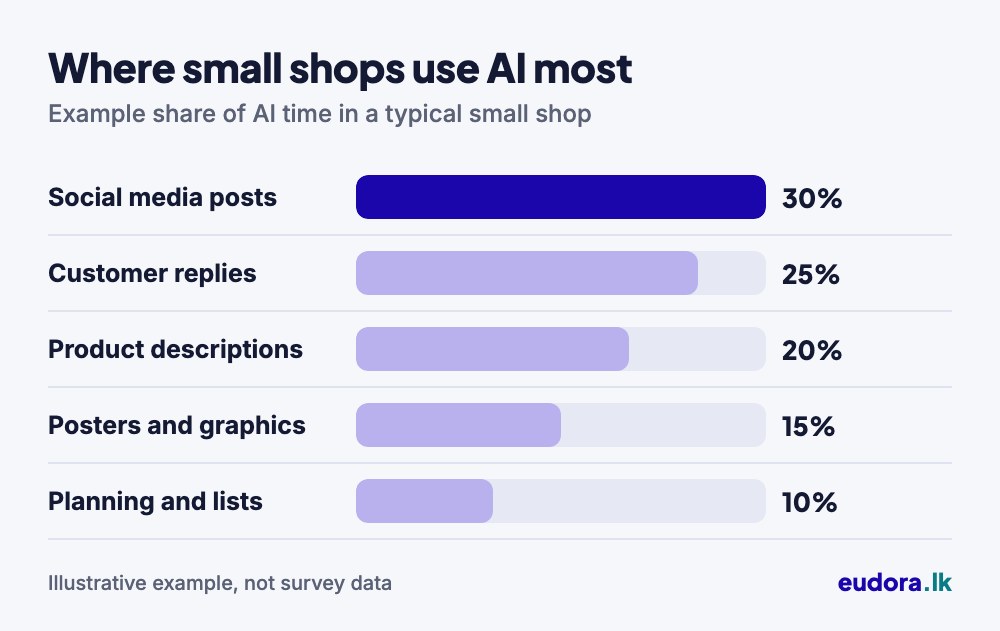
Posting regularly is one of the least expensive ways for a shop to stay in customers’ minds, and it is where AI saves the most time. Give the assistant your shop’s details once, then ask for posts.
- Describe your shop: “We are a family electronics shop in Kandy selling phones, accessories and CCTV. Our customers are local families and small businesses. Friendly, simple English.”
- Ask for a plan: “Suggest twelve post ideas for December, including Christmas and year-end offers.”
- Ask for drafts: “Write three of them, under 60 words each, with a call to visit the shop or message on WhatsApp.”
- Add your own photo: take a real picture of the product or shop.
- Check and post: correct prices, dates and stock before publishing.
Tip: Ask for Sinhala and Tamil versions too, then have someone fluent check them. AI drafts in local languages can sound unnatural or use the wrong formal level.
Faster, friendlier WhatsApp replies
Many questions are the same every day: opening hours, delivery areas, warranty, payment methods, whether an item is in stock. Use AI to draft a set of clear, polite answers once, then save them as WhatsApp Business quick replies. You keep control of every message, and replies become consistent across staff.
Do not paste customers’ names, phone numbers or order details into free AI tools to write individual replies. Write the reply in general terms and add the details yourself.
Product descriptions that sell
If you sell online or on Facebook Marketplace, good descriptions help customers decide and reduce questions. Give the AI the product’s real specifications from the box or manufacturer’s page, and ask for a short, honest description with the key benefits and a specification list.
- Include the exact model number and warranty terms.
- Ask for benefits in everyday language, not marketing jargon.
- Check every specification against the box or the manufacturer’s site.
- Never let AI invent features, certifications or warranty periods.

Spreadsheets, stock lists and quotations
Many shops keep stock and price lists in Excel or Google Sheets that have grown messy over the years: duplicate items, inconsistent names, prices typed as text. AI assistants are good at tidying these. Paste a small sample, describe what you want, and ask for a formula or step-by-step instructions rather than handing over the whole file. For example: “Write an Excel formula that adds 18% to the cost price in column C and rounds up to the nearest 50 rupees.” Check the result on a few rows before applying it everywhere.
Quotations are another quick win. Ask the assistant for a clean quotation template with your shop name, item table, totals, validity period and payment terms, then fill in the real figures yourself. A professional-looking quotation helps small shops compete for business and government orders.
Answering reviews and complaints
Google reviews influence where people shop, especially for electronics and services. Replying to every review, good or bad, shows you care. AI can draft warm thank-you replies quickly and help you respond calmly to a negative review. For complaints, use AI only to help you find polite words; the decision about a refund, repair or apology must be yours, and it is often better to move the conversation to a phone call.
What AI should not do for your shop
Good jobs for AI
- First drafts of posts, replies and descriptions
- Ideas, plans and checklists
- Tidying spreadsheets and price lists
- Polite responses to reviews
Keep for humans
- Final prices, stock and delivery promises
- Product photos (use real ones)
- Handling complaints and refunds
- Anything involving customers’ personal data
Fake reviews and AI-made product photos are not only dishonest; they are increasingly easy to spot, and platforms label AI images automatically. A shop’s reputation is built on trust, and one exposed fake can undo years of good service.
Doing it yourself or getting help
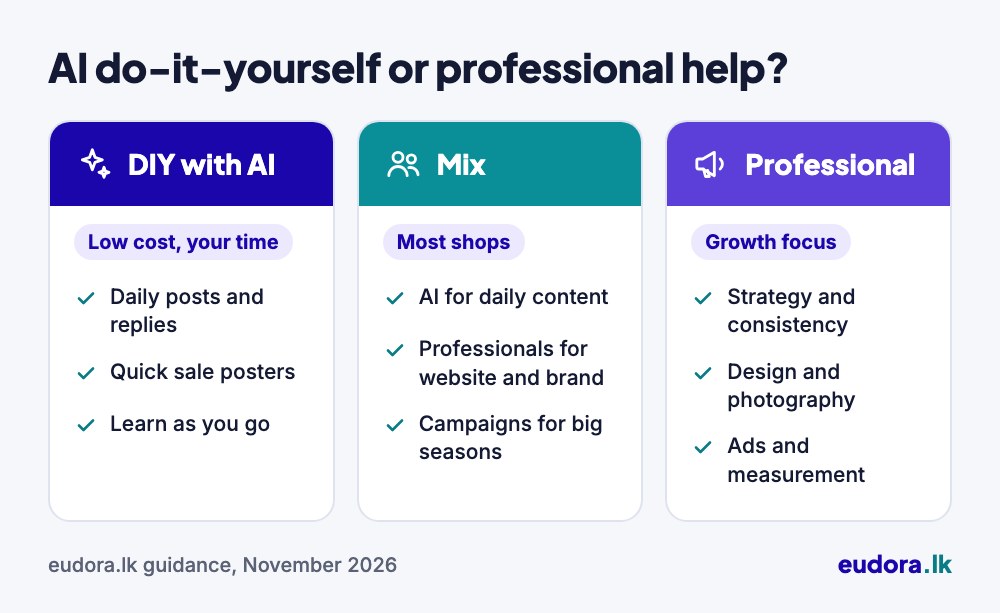
AI makes do-it-yourself marketing realistic for many shops. Where it falls short is consistency, strategy and design quality over months. Some owners use AI for daily posts and pay professionals for a website, branding and occasional campaigns. As a guide, our Social Media Starter plan for a year comes to Rs 178,800, and a business website with a year of our care plan to Rs 118,700. Compare that with the value of your own time spent on marketing each week.
Our digital marketing team uses AI tools for drafting with human checking, and our website design service builds shop sites with real product photography. We also run a short staff awareness session that covers safe AI use alongside scams.
Whichever route you choose, measure the results simply. Note how many messages, calls and walk-in customers mention a post or offer, and which kinds of posts get the most replies. After a couple of months you will know which AI-assisted content actually brings customers through the door.
Getting started this week
- Install the ChatGPT or Gemini app and sign in with a business email.
- Turn off training on your chats in the privacy settings; see our AI privacy guide.
- Write a short description of your shop and save it to reuse in prompts.
- Create ten WhatsApp quick replies with AI’s help.
- Plan next month’s posts in one sitting.
Frequently asked questions
Do I need to pay for AI tools to use them in my shop?
No. The free versions of ChatGPT, Gemini and Canva cover most needs of a small shop. Pay only if you regularly hit the free limits.
Can AI write posts in Sinhala and Tamil?
Yes, but quality varies. Use AI for a first draft and have a fluent speaker check before posting.
Is it okay to use AI-generated product photos?
No. Use real photos of the products you sell. AI images can mislead customers and damage trust.
Can AI reply to customers automatically on WhatsApp?
Automated AI replies are possible with business tools, but most small shops do better drafting replies with AI and sending them personally.
Is customer information safe in AI tools?
Keep names, phone numbers and order details out of free AI tools. Write replies in general terms and add details yourself.

Eudora Technology is a Kandy-based team working on CCTV, networks, IT support, cloud and websites for homes and businesses across Sri Lanka.