AI Image Generators Compared: ChatGPT, Gemini, Midjourney, Firefly and Canva
Which AI image tool is best for social posts, product images, posters and design ideas in 2026, what each costs, and the copyright and honesty rules to follow.
A few years ago, making a poster or a social media graphic meant hiring a designer or wrestling with design software. Now you can type “a bright poster for a New Year sale at a Kandy electronics shop” and get several options in seconds. AI image generators have become good enough that businesses, students and families use them every day. They are also easy to misuse: fake product photos, images that copy an artist’s style, and pictures that look real but show things that never happened. This guide compares the main tools in 2026, explains what each is good at and what it costs, and sets out the honest-use rules every business should follow.
Key points
- ChatGPT and Google Gemini now generate and edit images inside the chat, and lead blind comparison tests for realism and following instructions.
- Midjourney is still favoured for artistic style; Adobe Firefly for commercial safety; Canva for quick business graphics with templates.
- Commercial use rights usually come with paid plans, and terms differ, so read them before using AI images in advertising.
- Never use AI to create fake product photos, fake reviews or misleading images of real people.
- AI images often carry invisible watermarks or content credentials that platforms can detect and label.
How AI image generators work
Image generators are trained on very large collections of images and their descriptions. When you type a prompt, the model creates a new image that matches the description, starting from random noise and refining it step by step. Newer tools also edit existing images: change the background, add an object, fix lighting or turn a rough sketch into a finished graphic. Some are now built into chat assistants, so you can refine an image by simply asking for changes in conversation.
The results are new images, not copies, but they reflect what the model learned from. That is why questions about training data, artist styles and copyright matter, and why some services take more care than others.
The main tools compared
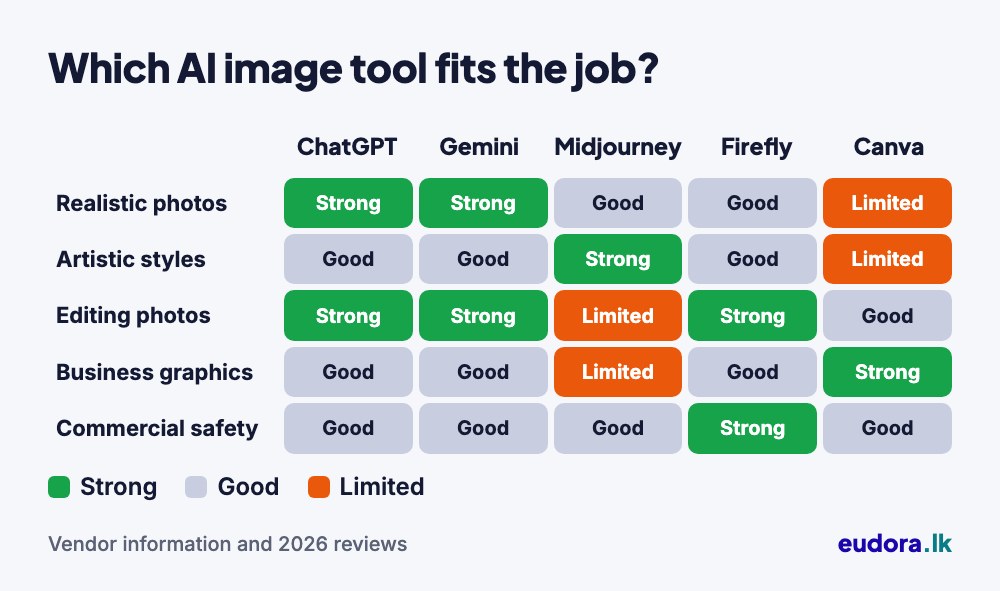
| Tool | Where to use it | Strengths | Watch out for |
|---|---|---|---|
| ChatGPT images | ChatGPT app and web | Follows detailed instructions, edits by conversation, good with text in images | Free tier limits; check usage terms |
| Gemini images (Nano Banana) | Gemini app, Google products | Realistic photos, consistent characters, fast edits | Free tier limits; images carry SynthID |
| Midjourney | Web and Discord | Distinctive artistic and cinematic styles | Paid plans only for most use |
| Adobe Firefly | Firefly web, Photoshop, Express | Trained on licensed content; built into Adobe tools | Credit limits; indemnity only on eligible plans |
| Canva AI | Canva web and app | Fast business graphics with templates and brand kits | Less control over fine detail |
| Microsoft Designer / Copilot | Copilot, Designer, PowerPoint | Convenient inside Microsoft tools | Fewer advanced controls |
Reviewers in 2026 generally rank OpenAI’s and Google’s models at the top of blind preference tests for realism and following instructions, with Midjourney strongest on aesthetics and Ideogram often chosen for text-heavy designs. Rankings change with each release, so try two tools on your own task before paying for one.
Which tool for which job?
| Job | Good choice | Why |
|---|---|---|
| Social media post for a sale | Canva AI or ChatGPT | Templates, text and your logo in one place |
| Poster with clear Sinhala, Tamil or English text | Generate the image, add text in Canva | AI still misspells text, especially in Sinhala and Tamil script |
| Mood board or concept art | Midjourney or Gemini | Strong visual styles and quick variations |
| Editing an existing photo | Gemini, ChatGPT or Photoshop Generative Fill | Change backgrounds, remove objects, fix lighting |
| Advertising for a larger client | Adobe Firefly | Licensed training data and indemnity options |
| Slides and documents | Copilot in PowerPoint | Works where the slides are |
Tip: AI is weak at writing Sinhala and Tamil letters inside images. Generate the picture without text, then add your words in Canva or another design tool using a proper Unicode font.
Cost and free tiers
Most tools let you try image generation free with daily or monthly limits. ChatGPT and Gemini include image generation in their free and paid plans, with higher limits on paid plans of about USD 20 a month. Midjourney is subscription-only for most users. Adobe Firefly and Canva use monthly credits, with more included in paid plans. For a small business creating a few graphics a week, a Canva Pro plan or an existing ChatGPT or Gemini plan is usually enough.
If you would rather have consistent, on-brand graphics made for you, our branding and design service offers a social media design pack of ten designs for Rs 7,900, and our designers use AI tools where they help, with human checking for quality and brand consistency.
Copyright and commercial use
Rules about AI images are still developing, and they differ by country and by service. A few principles are consistent.
- Read the terms. Most services grant commercial use rights on paid plans; some restrict free-tier use.
- Avoid famous characters, logos and brands. Generating someone else’s trademark or character for commercial use invites legal trouble.
- Do not imitate a living artist by name for commercial work; it is unfair and some services block it.
- Copyright in AI images is uncertain. In several countries, purely AI-generated images may not be protected by copyright, so competitors could reuse them.
- Adobe Firefly is trained on licensed and public-domain content, and Adobe offers intellectual property indemnity on eligible business plans, which some larger clients require.
Honest use: what not to do
The biggest risk for a business is not legal; it is trust. Customers in Sri Lanka are increasingly aware of AI images, and being caught using them dishonestly damages a reputation quickly.
Fine to do
- Background scenes and decorative graphics
- Concept images clearly presented as ideas
- Festival greetings and sale posters
- Illustrations for blog posts and presentations
Do not do
- Fake photos of products you sell
- Fake “customer” photos or reviews
- Realistic images of real people without consent
- Images of events that did not happen
On eudora.lk, for example, every product image is a real photo of the product, and our blog uses real photos and charts drawn from real data. Many platforms now detect AI images through invisible watermarks and content credentials and label them automatically; our guide to spotting AI-generated photos and videos explains how that works.
What about AI video?
AI video generators from Google, OpenAI and others can now produce short, realistic clips from a text description or a still image. For businesses they are useful for short social media animations, product explainers built from your own real photos, and background footage. They are also the tools behind many convincing fake videos, so the same honesty rules apply even more strongly: never show a product doing something it cannot do, and never create a video of a real person saying things they did not say.
Video generation uses far more computing power than images, so free tiers are very limited and paid plans are more expensive. For most small businesses, short clips made from your own real product photos, with simple motion and text, are more effective and more honest than fully generated video.
Writing good image prompts
- Describe the subject clearly: what, where, who, and what is happening.
- Set the style: photograph, flat illustration, watercolour, 3D render.
- Give composition details: close-up, wide shot, background colour, space for text on the left.
- Specify the format: square for Instagram, vertical for stories, wide for banners.
- Refine: ask for changes one at a time rather than starting again.
For example: “Flat illustration of a family enjoying a festive Avurudu table, warm colours, plenty of empty space at the top for a headline, square format.” Then add your shop’s text and logo in a design tool.
A good screen makes a difference
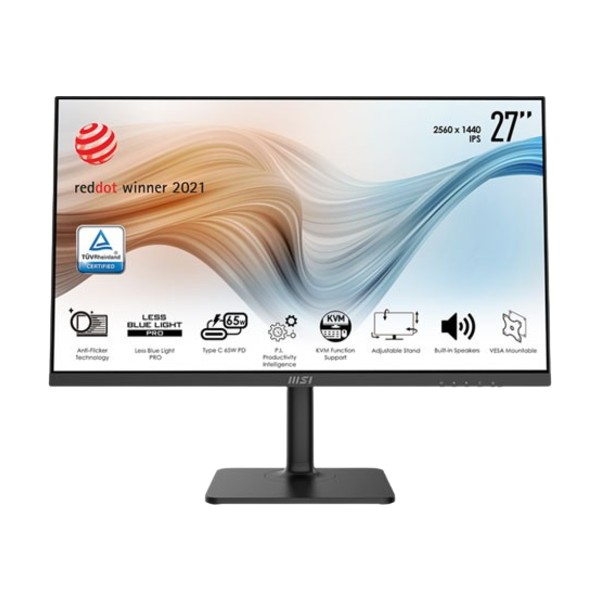
If you design graphics regularly, a monitor with accurate colours helps you see what customers will see. Many budget screens show colours that are too blue or washed out, so graphics look different on phones. A monitor that covers most of the sRGB colour range, the standard for web and social media, is a sensible upgrade for anyone making marketing content.
Our guide to choosing a monitor explains resolution and colour coverage. For marketing that goes beyond graphics, our digital marketing team can plan content that uses AI responsibly.
Frequently asked questions
Which AI image generator is best for beginners?
Canva’s AI tools or ChatGPT, because you can describe what you want in plain language and refine it, and Canva adds ready-made templates.
Can I use AI images for my business advertising?
Usually yes on paid plans, but read each service’s terms, avoid other brands and characters, and never use AI to fake product photos.
Why does AI write spelling mistakes in images?
Image models are not perfect at drawing letters, especially non-Latin scripts. Add text separately in a design tool.
Are AI images free of copyright problems?
Not automatically. Avoid copying brands and named artists, and know that purely AI images may not be protected by copyright in some countries.
Will people know my image was made with AI?
Often. Many tools add invisible watermarks or content credentials, and platforms increasingly label AI images automatically.

Eudora Technology is a Kandy-based team working on CCTV, networks, IT support, cloud and websites for homes and businesses across Sri Lanka.