AI Study Tools for Students in Sri Lanka: What Helps and What to Avoid
How O/L, A/L and university students can use ChatGPT, Gemini and NotebookLM to learn faster without cheating, with a comparison of the free tools and study habits that work.
AI chatbots have arrived in Sri Lankan classrooms whether schools like it or not. Students use them to explain chemistry questions at midnight, check English essays, summarise university readings and practise for O/L and A/L exams. Used well, they are like a patient tutor available at any hour. Used badly, they produce work the student does not understand, contain mistakes that look convincing and can break school and university rules. This guide compares the free AI study tools that work well in 2026, shows how to use them to actually learn, and explains the honest-use rules that keep students out of trouble.
Key points
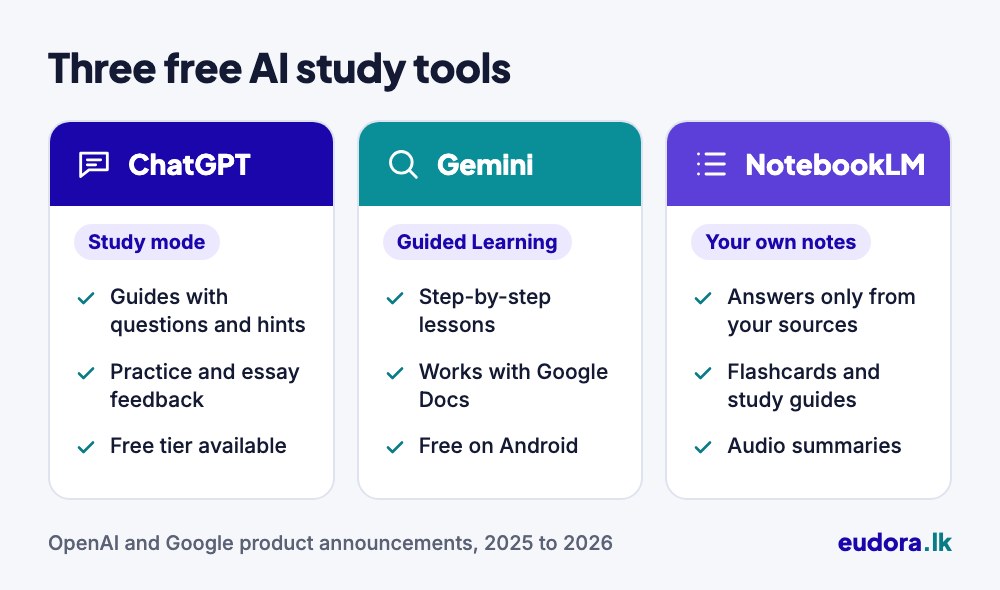
- The best free study tools are ChatGPT with Study mode, Gemini with Guided Learning and Google’s NotebookLM.
- Study modes ask questions and guide you step by step instead of handing over answers, which is how learning sticks.
- NotebookLM answers only from notes and textbooks you upload, which reduces made-up answers.
- AI makes mistakes, especially with local syllabus details, Sinhala and Tamil terms and recent events. Always check against your textbook and teacher.
- Submitting AI-written work as your own can break school and university rules. Use AI to understand, not to replace your work.
The free tools compared
All the tools below have free versions that are enough for most students. They run in a web browser or a phone app, so an ordinary laptop or smartphone with a stable internet connection is all you need.
| Tool | Best for | Study feature | Limits |
|---|---|---|---|
| ChatGPT | Explanations, practice questions, essay feedback | Study mode: guides you with questions | Free tier usage limits |
| Gemini | Explanations, diagrams, Google Docs users | Guided Learning: step-by-step lessons | Free tier usage limits |
| NotebookLM | Revising from your own notes and readings | Answers only from your sources; audio summaries; quizzes | Needs good source material |
| Claude | Long readings and writing feedback | Learning-focused style on request | Free tier usage limits |
| Copilot | Help inside Word and PowerPoint | Works with school Microsoft accounts | Full features need some plans |
Why study modes matter
A normal chatbot answers your question directly. That feels helpful, but research on learning consistently shows that being told an answer is far less effective than working it out with guidance. In 2025 OpenAI added Study mode to ChatGPT and Google added Guided Learning to Gemini. Both ask you questions, give hints, check your reasoning and only explain fully when you are stuck, much like a good tutor.
- Turn on Study mode or Guided Learning from the tools menu in the chat.
- Tell it your level: “I am studying A/L Combined Mathematics” or “O/L Science, grade 11”.
- Ask about one topic at a time, such as “help me understand Newton’s second law”.
- Answer its questions honestly, even if you are unsure. The hints are where you learn.
- Finish with a short quiz: “give me five questions on this, then mark my answers”.
NotebookLM: revise from your own notes
NotebookLM, from Google, works differently. You upload your own sources, such as lecture slides, textbook chapters, past papers and class notes, and it answers questions only from those sources, with references to the exact passages. That makes it much less likely to invent facts, and it keeps you aligned with your own syllabus.
- Ask for a summary of each chapter in simple language.
- Generate a study guide or flashcards from your notes.
- Create an Audio Overview, a spoken discussion of your notes you can listen to on the bus.
- Ask it to find where your notes disagree or leave gaps.
Only upload material you are allowed to use, and avoid uploading other students’ work or exam papers that are meant to stay confidential.
Sinhala, Tamil and the local syllabus
AI tools are trained mostly on English material from other countries. They understand Sinhala and Tamil and can explain in those languages, but technical terms may differ from the ones in Sri Lankan textbooks, and answers can sound unnatural. They also do not know the exact Sri Lankan syllabus, marking schemes or recent curriculum changes unless you give them the material.
Tip: Ask for an explanation in English first, then ask for the key terms in Sinhala or Tamil, and compare them with your textbook. Uploading your own notes to NotebookLM keeps explanations close to your syllabus.
Our guide to AI translation for Sinhala and Tamil compares the tools for language work.
Honest use: help versus cheating
Schools and universities in Sri Lanka are updating their rules, and many now treat undisclosed AI-written assignments as academic misconduct. AI detection tools are unreliable, but teachers notice when work does not sound like the student or when the student cannot explain it. The safe approach is simple: use AI to learn, then produce your own work.
Good uses
- Explaining a topic you did not understand in class
- Practice questions and marking your answers
- Feedback on grammar and structure of your own essay
- Planning a revision timetable
- Summarising long readings to decide what to read closely
Avoid
- Submitting AI-written essays or answers as your own
- Using AI during exams or closed assessments
- Copying references the AI suggests without checking they exist
- Relying on AI for facts without checking the textbook
If your teacher allows AI for an assignment, say how you used it. Many universities now ask students to declare AI use.
Prompts that work for studying
| Goal | Example prompt |
|---|---|
| Understand a concept | “Explain osmosis to a grade 10 student using an example from daily life, then ask me two questions to check I understood.” |
| Practise maths | “Give me a past-paper style A/L question on integration by parts. Do not show the answer until I try.” |
| Improve writing | “Here is my English essay. Point out grammar mistakes and unclear sentences, but do not rewrite it for me.” |
| Revise | “Make ten flashcards from these notes, question on one side, answer on the other.” |
| Plan | “Make a six-week revision plan for O/L Science and Maths, two hours a day, with rest on Sundays.” |
Mistakes to watch for
AI chatbots can be wrong while sounding certain. They sometimes invent book titles, research papers or quotations, make arithmetic slips in long calculations and mix up dates and names. Treat every answer as a draft to check. For maths and science, ask the AI to show each step and check the steps yourself. For history and civics, confirm facts in your textbook. If two AI tools disagree, that is a sign to check carefully.
What equipment do you need?
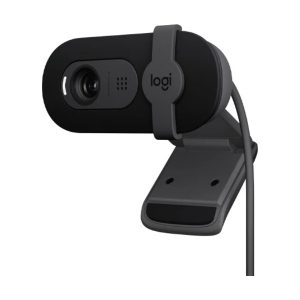
You do not need a powerful computer for AI study tools; the processing happens online. A reliable laptop with a good keyboard and screen makes long study sessions easier than a phone, and a headset with a microphone helps with online classes and voice practice. A budget laptop such as the ASUS Vivobook 15 with a Core i3, 8GB of memory and a 512GB SSD, paired with a Logitech USB headset, comes to Rs 209,700.


Our back-to-school tech checklist covers the rest, and our laptop buying guide explains which specifications matter. For safety, our guide to AI privacy settings shows how to keep study chats private.
Studying through power cuts and patchy internet
AI tools need an internet connection, which is a real limitation during power cuts or in areas with weak mobile signal. Plan for it. Download your notes and past papers so you can keep studying offline, and use AI sessions for the moments when you are connected: ask for explanations and practice questions, then save them as a document to work through later. NotebookLM’s audio summaries can be listened to while travelling, and a charged power bank keeps a phone and router running through a short outage.
Data costs matter too. Text chats use very little data, but voice conversations, image uploads and audio summaries use more. Students on limited mobile packages can save data by typing questions, photographing only the part of a page they need, and doing heavier work over home Wi-Fi.
A note for parents
Banning AI rarely works and leaves children without guidance. Agreeing rules together works better: AI for understanding and practice, not for writing homework; no personal details shared; and regular conversations about what they are learning. Most AI services require users to be at least 13, and some need parental consent until 18, so younger children should use them only with an adult.
Frequently asked questions
Is ChatGPT free for students in Sri Lanka?
Yes, the free version is available and includes Study mode. Paid plans add higher limits but are not necessary for most students.
Can AI help me prepare for O/L and A/L exams?
Yes, for explanations, practice questions and revision plans. Always check facts and methods against your textbook and past papers.
Will my teacher know if I used AI?
Detection tools are unreliable, but teachers often notice work that does not match a student’s usual style. Follow your school’s rules and declare AI use where required.
What is NotebookLM?
A free Google tool that answers questions only from sources you upload, such as your notes and textbooks, and can create summaries, flashcards and audio overviews.
Can AI explain lessons in Sinhala or Tamil?
Yes, but technical terms may differ from your textbook. Compare with your syllabus and ask your teacher if unsure.

Eudora Technology is a Kandy-based team working on CCTV, networks, IT support, cloud and websites for homes and businesses across Sri Lanka.