Cloud Bills in Dollars, Business in Rupees: How to Budget Cloud Costs
Cloud services are often billed in US dollars by card, which makes costs drift with the exchange rate. Practical ways to track, budget and cut cloud spending.
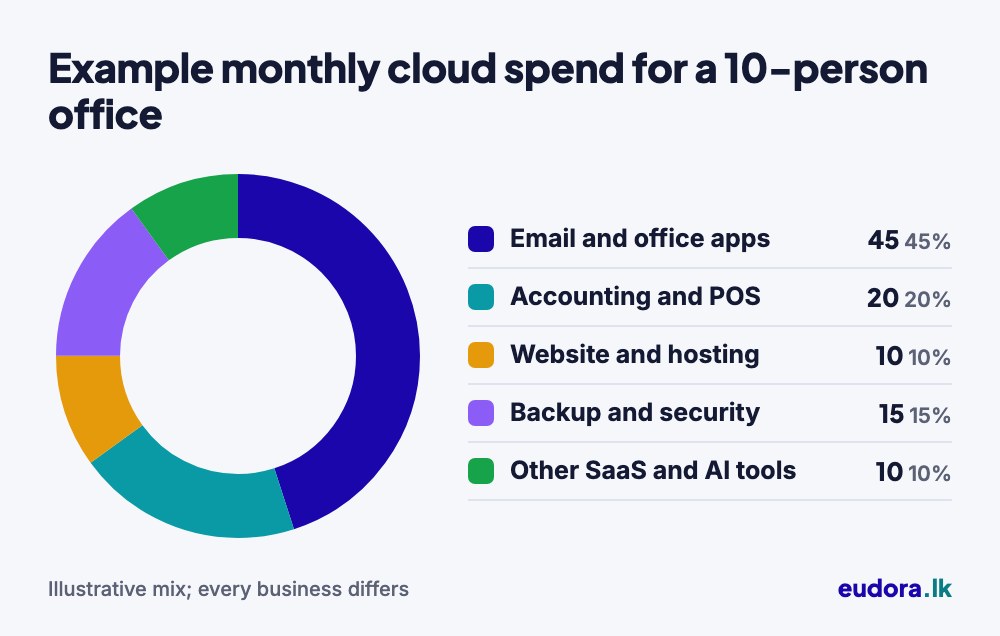
Moving to the cloud swaps large, occasional purchases for a stream of small monthly charges: email and office apps, accounting software, a website host, a cloud server, backups, design tools, AI assistants and storage. Each one seems affordable on its own. Together they become one of the bigger lines in the budget, and many are billed in US dollars to a company or personal card. When the rupee moves, the bill moves with it. Charges appear on statements under unfamiliar names, free trials turn into paid plans, and a cloud server resized for a busy week keeps running at the larger size for months. This guide explains where cloud costs come from, how to budget for them in rupees and practical ways to keep them under control.
Key points
- List every cloud and software subscription in one register with its cost, currency, renewal date and owner.
- Budget dollar-billed services with a margin for exchange rate movements and bank charges.
- Set billing alerts on cloud platforms so unexpected usage is caught within days, not at month end.
- Right-size servers, switch off what is idle, and clean up storage and old backups.
- Where possible, buy through a local partner billing in rupees, or choose annual plans for steady needs.
Where cloud costs come from
Cloud spending falls into two groups that behave differently. Subscriptions, such as Microsoft 365, accounting software and design tools, are a fixed price per user or per plan. Usage-based services, such as cloud servers, storage, bandwidth and AI services, are charged by what you consume, so they change from month to month.
| Type | Examples | How it is charged | Main risk |
|---|---|---|---|
| Per-user subscriptions | Microsoft 365, Google Workspace, CRM, design tools | Per user per month or year | Paying for leavers and unused seats |
| Plan subscriptions | Website hosting, online store platform, POS | Fixed monthly or yearly fee | Auto-renewal at higher prices |
| Usage-based cloud | Cloud servers, storage, bandwidth, databases | By the hour, gigabyte or request | Forgotten resources, sudden spikes |
| Managed services | Cloud backup, IT support, website care | Per device or per month | Coverage drifting from real needs |
The exchange rate problem
Most international cloud and SaaS providers bill in US dollars. When the rupee weakens, the same subscription costs more in rupees, and card payments can attract bank conversion charges on top. For budgeting, convert each dollar subscription at a cautious exchange rate and add a margin for bank charges, rather than using the rate on the day you signed up. Review the budget every quarter against actual card statements.
Some costs can be moved into rupees. Buying Microsoft 365 or other software through a local partner usually means a rupee invoice and local support; Microsoft 365 Family, for example, is available from us at Rs 37,000 a year, and business plans are quoted per user. Local hosting, IT support and backup services are priced in rupees too: our Managed Cloud Backup costs Rs 2,500 per device a month, so five computers come to Rs 150,000 a year with no currency exposure.
Tip: Use one company card for all cloud subscriptions, not staff personal cards. It makes every charge visible on one statement and stops services disappearing when someone leaves.
Build a subscription register
A simple spreadsheet is the most effective cost control tool. For every cloud service, record the name, what it is for, the business owner, number of users, cost, currency, billing cycle, renewal date, payment card and how to cancel. Go through twelve months of card and bank statements to find everything, including small charges that renew quietly. Our article on what cloud native means for businesses explains why the number of services grows over time.
Set budgets and alerts
Every major cloud platform, including AWS, Microsoft Azure and Google Cloud, lets you set a monthly budget and receive email alerts when actual or forecast spending passes a threshold. Set an alert at 50, 80 and 100 percent of the expected monthly bill, sent to at least two people. Alerts catch mistakes within days: a test server left running, a misconfigured backup filling storage, or an attack generating traffic. Many SaaS tools also show usage and seat counts in their admin pages; check them monthly.
Ten practical ways to cut cloud costs
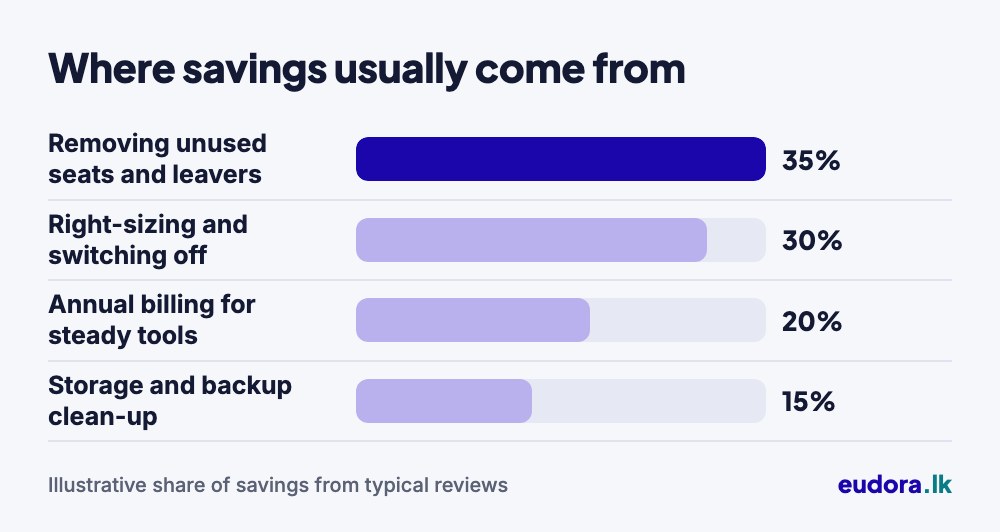
- Remove unused seats: leavers, inactive users and shared accounts that no longer need a paid licence.
- Match plans to needs: not every user needs the top plan; mix licence types where the provider allows.
- Right-size servers: check processor and memory use and choose a smaller size if it is consistently low.
- Switch off idle resources: test and development servers can be stopped at night and weekends.
- Delete forgotten resources: old snapshots, unattached disks, unused IP addresses and abandoned test environments.
- Manage storage: move old data to cheaper storage tiers and set retention rules for backups and logs.
- Use annual billing for steady needs: many SaaS tools discount annual plans; keep monthly billing for anything uncertain.
- Commit for predictable servers: reserved instances or savings plans cut the cost of servers that run all year.
- Use a CDN and caching: reduces server size and bandwidth for websites.
- Review before renewals: set calendar reminders 30 to 60 days before annual renewals to renegotiate or cancel.
Watch the hidden costs
Some charges surprise first-time cloud users. Data transfer out of a cloud platform to the internet is billed per gigabyte, so a popular download or video can cost more than the server. Backups and snapshots accumulate quietly. Logging and monitoring services charge by volume. Public IP addresses and load balancers have hourly fees. AI services charge per request or token, and costs scale with usage. Our guide to moving to a cloud server explains which websites need one at all.
Cloud or on-premises?
The cloud is not always cheaper. A server that runs at full load all day, every day, for years can cost more in the cloud than buying hardware. Storing large amounts of data that is rarely accessed may be cheaper on a local NAS with an off-site copy. A balanced approach suits many businesses: cloud for email, collaboration and customer-facing services, and a local NAS for large files and fast backups. A UGREEN NASync DH2300 at Rs 88,500 is a one-off purchase in rupees with no monthly fee. Our comparison of on-premises and cloud computing covers the decision.

A simple monthly and quarterly routine
Cost control works best as a habit rather than an annual panic. Once a month, compare the card statement with the subscription register, query any new or unfamiliar charge, and check each cloud platform’s billing page for unusual growth. Look at the number of paid users in Microsoft 365 or Google Workspace against the staff list. It takes less than an hour for a small business.
Once a quarter, go deeper. Review every subscription with its owner and ask whether it is still used, whether a cheaper plan would do, and whether another tool you already pay for does the same job. Check cloud server sizes against their actual use, delete old snapshots and test environments, and look at renewals due in the next three months. Update the budget with the latest exchange rate. Record the savings you make; seeing the numbers keeps the routine going.
When the business plans something new, such as a second branch, an online store or a new app, estimate its cloud costs up front, including the monthly charges after any free tier or introductory offer ends. Many cloud projects look cheap in the first month and expensive by the twelfth.
Making someone responsible
Cloud costs grow when nobody owns them. Assign one person to review the subscription register and cloud bills every month, approve new subscriptions, and lead a deeper review each quarter. In larger teams, give each department visibility of its own costs. An IT support provider can take on this role; our IT support plan at Rs 9,900 a month includes a regular review of licences and services. See our cloud solutions page for help with cloud cost reviews.

Data protection and leaving a service
When cancelling a cloud service to save money, export your data first and make sure the provider deletes what it holds, especially customer personal data. Check the notice period and whether data is kept for a time after cancellation. Our guide to cloud data and Sri Lanka’s PDPA explains why it matters where customer data ends up.



Frequently asked questions
Why did my cloud bill go up when I did not change anything?
Often because of the exchange rate, a price rise at renewal, growing storage or a forgotten resource. Check the invoice line by line.
Can I pay for cloud services in rupees?
Some, by buying through local partners or choosing local providers. Hyperscale clouds usually bill in dollars.
How do I stop surprise cloud bills?
Set budgets and billing alerts on every cloud account, and review usage monthly.
Is annual billing better than monthly?
For services you will certainly keep, annual plans are usually cheaper. Keep monthly billing for anything uncertain.
Who should own cloud costs?
One named person, often the finance lead or IT provider, should review the register and bills monthly.

Eudora Technology is a Kandy-based team working on CCTV, networks, IT support, cloud and websites for homes and businesses across Sri Lanka.